Showing posts with label Facebook. Show all posts

Tuesday, February 4, 2014

FACEBOOK’S Paper App Introduces New Way To Use Facebook

Facebook has released a brand new app called Paper, which introduces a seamless and beautiful way of viewing your News Feed. The app was released on to the App Store yesterday and is available as a free download.
Paper–Facebook-App
The app will slightly remind you of Flipboard, another popular News Reader app. The gestures in Facebook’s Paper app are similar to Flipboards, some would also say it looks a little like the latter. Paper also lets you browse through stories from major news publications via customized sections of your own based on different themes and interests. All the stories, articles, videos and photos are displayed in a beautiful layout, everything accessible via simple thumb movements.
Explore and share stories from friends and the world in immersive designs and fullscreen, distraction-free layouts. Paper includes your Facebook News Feed and sections about your favorite topics.
View high-resolution photos by tilting your iPhone or iPod Touch and videos in fullscreen mode. Paper fills the entire screen with content from your News Feed. A separate tab lets you choose between your personal News Feed and added sections. And yes, you can like, comment and share your own stories using the Paper app. Check out this introduction video below:
Paper is currently only available for iOS devices and requires iOS 7 or higher. There is no iPad version as of now. You can download Paper from the App Store for free. Let us know what you think about this new way of checking your Facebook News Feed.
Download Paper for iPhone and iPod Touch [iTunes link]

Monday, February 3, 2014

FACEBOOK 10th Anniversary Celebration [InfoGraphic]

Facebook, the world’s most popular social networking website was born on February 4th 2004. 10 years on and the website is as strong as ever with over 1000million users. This number is phenomenal in itself but more so for the fact that the medium of social networking was largely unheard of until the early 2000s. While Facebook was not the first social network on the scene, it is certainly the one that all the others emulate in terms of its size. Growing from 1million users in 2004 to 6million in 2005 is a notable achievement at the outset of any company. This info-graphic explores the fascinating 10 year history of the success story that is Facebook. It covers what the interface looked like at inception stage and also charts the popularity of the social networking medium throughout the world. A closer investigation is taken at the numbers behind the company, addressing the 2012 initial public offering (IPO) and other interesting statistics. Revenue is paramount to all companies and this is examined for Facebook in the infographic also. An interesting comparison is also covered which pitches Mark Zuckerberg’s giant with another social networking power, Twitter.

 photo facebook10yearsinfographic_zpse63b72e0.jpg


About the Guest Author:

Eddie founded DPFOC in partnership with Kalpesh in 2008 after graduating from University College Cork with an honours degree in business. Eddie, a Google AdWords Qualified Individual, is passionate about lifelong learning and is the driving force behind the culture of workplace learning that exists within DPFOC. Eddie spends over 3 hours each day studying latest online marketing trends and techniques and works closely with senior staff to ensure that the quality of the service being provided to clients around the world is improving every day.

PLEASE HELP US TO SPREAD OUR WORDS:

0 comments :

Post a Comment

Follow by Email

Friday, January 17, 2014

How To Merge Different Name Pages On Facebook

Merge PagesFacebook is world largest social media platform for connecting people. Facebook Include number different features by which you can interact with different people like by Using your Profile, Pages , Groups and Events. These Feature Helps to grow you personal network or any business at faster speed. But in all them Facebook Pages are the giant and best platform to interact with different people all around the world. Facebook Pages grow and faster speed as compare to others.
But sometime we have too many different pages and we don't have too much time to post on every page regularly and keep them active. So here i am going to introduce an amazing Facebook Tricks about merging different name pages which helps you to transfer your likes in another page.


Important Note:- After the Successful Working of this amazing trick for few weeks. Now few days back in Starting of Sept Month. Facebook Engineers Understand  our Technique :p. Now this method is not working for some locations.So I suggest Everyone To follow new method to merge pages which is better and simple that this old one

Merge Facebook Pages of Same or Different Page Name in 0 Like Also


Steps To Merge Different Name Facebook Pages


Here i am going to start this amazing tricks simple follow all the steps one by one carefully about merging or combining different name pages.

1st Part :-  Add Proxy


Firstly you have to add below given proxy to your Browser

Proxy:-  83.111.92.120

Port:-     3128

Steps For Mozilla Firefox

  • Go To the Tools  tab in Menu bar at top of your browser >> Then Option Button
  • Now Click on the Advance Tab >> Now select network tab >> Then click Settings
Mozilla Proxy Settings
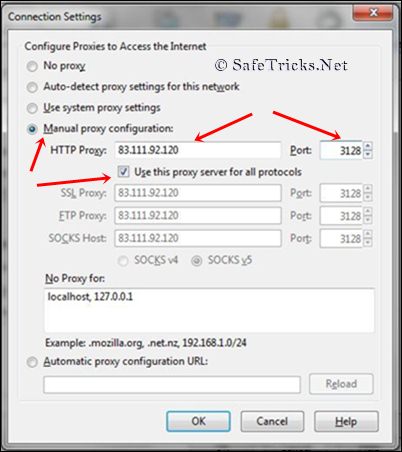
  • Then Click on Manual Proxy and Add Above given Proxy and Port
  • After Pasting Proxy and Port also check button for using this proxy for all port. As shown in below image.
Mozilla Proxy Settings

Steps To Add Proxy in Google Chrome

  • Go to Setting Tab of Chrome on Right Top Side menu
  • Then Click on Show Advance Setting Option which comes at last in Settings window
  • Then Find Network tab and click on Change Proxy Settings

Chrome Proxy Settings
  • New Pop Window will appear >> Click on Setting button Just below of remove button
  • Then Add above given proxy and Port and all Tick the button of Bypass Proxy settings

Chrome Proxy Settings

Important Note:-  Sometime their may be a problem in internet connectivity while Log in Facebook account after using proxy.So i suggest if you also face problem. Then Log in Account First and then Add Proxy setting to browser

2nd Part Steps To Translate Page Name

  • After following all steps of 1st part then follow below steps to merge pages
  • Firstly Open your all pages which you want to merge.
  • Then Click on the Edit Page Setting >> Update Info From Admin panel of All Pages
Facebook Edit Page
  • After Opening Update Info Panel of all pages now change your language settings from button at the bottom of the page. 
Facebook Language

  • Now select Asia-Pacific >> Then Select Simplified Chinese ( China )
Facebook Language Change
  • After Selecting Language Refresh All Update Info panels of all pages
  • In Info panel of each page their is an option of  Translate Page Name Click on it.

Facebook Translate Page name
  • Now copy the Chinese  word which is on Left side when we click on Translate Option.
  • Copy that word and paste them in Box of Chinese and Then Save it.
Facebook Translate Page name
  • Follow this Translates Name Step For all pages which you want to merge.

3rd Part Steps To Merge Different Pages

  • After Translating name of all pages
  • Click on Settings tab of all Pages in which is at second button after Update Info Tab

Facebook Settings tab
  • Now At the Last 2rd Position Their is an option of Merge Duplicate Page.
 
Facebook Merge Pages
  • Click on the Merge Duplicate Page
  • Now List of all the pages will appear of all  translate name pages.
  • Now Check then Pages which You want to merge.
  • After Selecting click on done button now your pages will disappears and their likes will transfer in that pages in which we merge.   
  • Now Change Your Language again into English
  • Now Remove Your Manual Proxy and Select System Proxy settings

All Done :)

Some Important Things to Keep In Mind While Using This Tricks

  • Don't Forget To Remove Proxy after using it. If you continue using proxy you account may get block or Their will be a Proxy blockage.
  • Translate Page name will done once for particular. So Use correct method white translate and never remove translate name. Otherwise you will not able to merge.
  • Merge Will be done in Big pages means your smaller pages can be merge in Big once. Not Big once into smaller.
  • Suppose If you have two pages 1st Page with 10,000 Likes and 2nd with 5,000 Likes.
  • You can merge 2nd Page into 1st one But don't able to merge 1st one into 2nd.
  • After Merging Your 2nd pages will disappears and 5,000 likes will transfer into 1st one and Your will become of 15,000 likes.
  • You can merge upto 5,6 pages in single Page then error may be occur.

All the steps of this Tricks is ended. I hope You enjoy this tricks and find this amazing and able to do this successfully. But if you face any kind of problem in any step of this tutorial feel free to share you precious comment

How To Make Single Name Or How To Remove Last Name From Facebook Account?

Facebook is Now biggest social media site with millions of daily users but the amazing think about Facebook is all Facebook tricks and facts like Facebook chat code tricks but their are many spam which may you attack your account protection but we provide only safest way to enjoy Facebook. If have doubt related to security so lets you to compromise your account must read my opinion about make account secure and increase account protection.
Now here new safest tricks to make single Facebook account. It is not possible to Make account on Facebook without Last name because it is against the policies of Facebook. But if you want to make your Facebook profile with First name without using last name then simply follow my given steps.

Note:- After few months of successful working of this trick. now few days back Facebook start blocking this Ip address for many countries and places. So i don't guaranty about it, So please try it i hope its may work for your place.

This trick is working for Mozilla Firefox so try it on Mozilla.

  • Firstly Change your Browser Proxy Manually use one of the proxy from below given.
HTTP Proxy :-  

  • 119.252.160.34
  • 202.43.188.143
  • 118.98.35.251 
  • 36.76.182.173
  • 61.247.45.35
  • 180.250.169.14
  • 180.250.82.188
  • 119.252.160.34
  • 219.83.100.195
  • 110.139.125.230
  • 202.87.254.156    


PORT :-             8080

  • Then Save Your Settings.
  • Now Open your Facebook Account  Name Settings.
  • Change your language from English (us) to Bahasa Indonesia 
  • Then  Simply remove Your Last Name And Save it. 
  • Now Your Facebook Account is only with First Name Without Last Name.
  • After Completing all steps remove Manual Proxy and select  use system proxy settings and change change your language back to English (us)
Note:-  
  • Firstly Open your Facebook account settings then change proxy because sometime after changing proxy their will be error in log in account 
  • Please Don't Forget To Remove Proxies After Using. So if you  want to enjoy this tricks for long time. Always Remove Proxies :)